
There are a lot of write-ups on relative periods, and different methods exist for a variety of tools. Interestingly each platform requires special handling, e.g. COGNOS Transformer & TM1 handles relative periods differently to SSAS multidimensional, and again differently to SSAS Tabular, than you have paginated reporting tools such as SSRS, Crystal reports, BO when reading directly off a database, they need another method to handle relative periods, and soon we end up maintaining a few methods to handle the same relative period logic.
Add to that additional complexity if your organisation uses a CUSTOM date calendar, in which case not all of the builtin functions for the platforms may work!!
I have been on a similar journey with my current company, using COGNOS Transformer, SSAS multidimensional, SSAS tabular, SSRS & Power BI, and ended up managing multiple methods of maintaining relative period logic. Each platform requiring something slightly different, and worse, if rolling out new relative period calculations, the rollout process would be lengthy and error prone! Plus the organisation uses a CUSTOM date calendar, so most of the builtin MDX functions like ParallelPeriods are no good :(.
Looking for a better way to manage this, I came up with a data model that I believe could be maintained centrally and accessed by multiple platforms for relative periods .
The design consists of the following:
- Relative Periods modeled in a database (central foundation piece)
This model will consist of the Date dimension which will mirror the organisations calendar. - Using the foundation database objects, incorporate these in the relevant tools, e.g. SSAS multidimensional, SSAS tabular, SSRS etc….
- Any relative period changes or addition of new periods are applied to the central foundation database model, and as long as the tools have incorporated these objects correctly, they will all be able to use the new periods easily.
Relative Periods Database Model
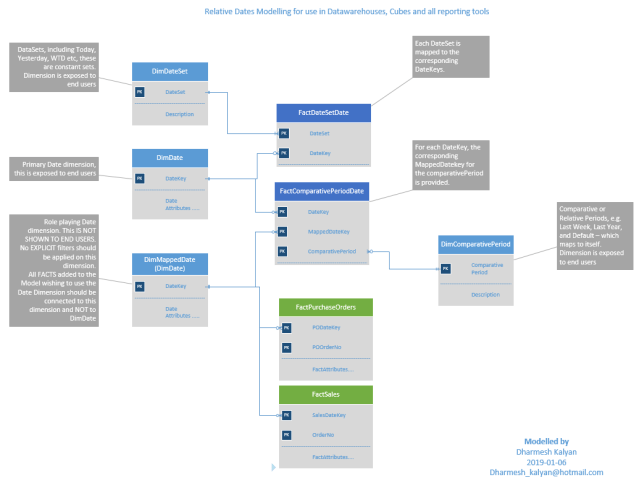
The foundation database model for the relative period design
The database model consists of the following tables/views:
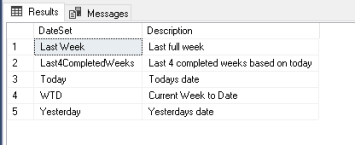
- DimDateSet
a dateset defines the constant relative periods, e.g. Today, Yesterday, Current Week, for these relative periods, there are only a constant set of dates on a daily basis.
no dates are specified here, only the dateset names.
Sample contents below:
- DimDate
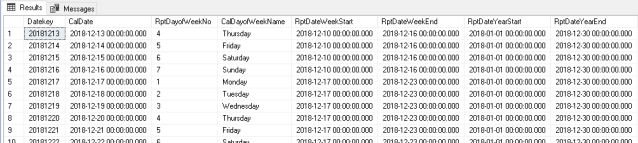
the traditional date dimension, here you would define the calendar as required by the organisation. The Primary key is the DateKey which is in the format YYYYMMDD
Note: Except for RelativePeriod Facts, no Fact table should join to this dimension
Sample contents below:
- DimMappedDate
role playing dimension, this is a view based on DimDate and only exposing the DateKey.
all facts with measures are mapped to this dimension. - DimComparativePeriod
relative periods where a comparison is done for a selected date, these are different to datesets, that are constant. e.g. for any given date, show the same day Last week, or same day Last year etc. No dates are specified here, only the comparative period names.
Sample contents below:

- FactDateSetDate
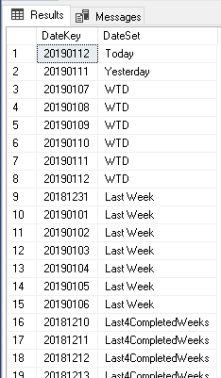
factless fact that bridges DimDateSet and DimDate. It is in this object, where the Datesets are mapped to the corresponding Datekeys. Since the dates for each dateset will change daily, this object could be a view consisting of multiple UNION select statements (one for each Dateset). Else if performance is essential, than this could be stored as a table (you will need to have a refresh process to update this daily)
Sample contents below:
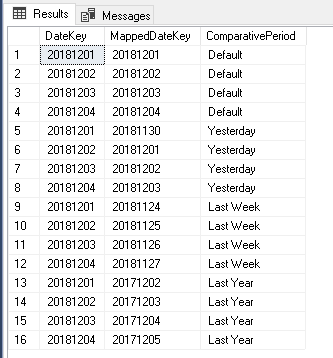
- FactComparativePeriodDate
factless fact table bridges DimDate, DimComparativePeriod & DimMappedDate.
for each comparativeperiod, all datekeys from DimDate are mapped to a corresponding MappedDateKey,
e.g. for comparative period Last Week, all dates from the DateDimension are mapped to the corresponding date 7 days back.
Sample contents below:
These database objects are related as below:
The foundational database model for the relative period design
With the above database model in place, you can now use that in any reporting platform to build your relative periods as needed.
My next post will walk through how to use this in SSAS dimensional & tabular models.

 Dharma's Data Blog
Pingback: Relative Period Modelling Part 2 – SSAS Multidimensional & ZERO MDX! | Dharma's BI Blog